This is the last part of our iOS Pentesting series. If you haven’t read the previous series, then please visit our First and Second part to know more…
In this blog we are going to focus on the following points:
1. JailBreak detection Bypass
- Using Tweaks
- Using Publicly available frida scripts
- Using Using the default Jailbreak Bypass module that is available in Objection framework.
- Making our own Frida script for bypassing JailBreak detection.
2. Setting up the Proxy and Bypassing SSL Pinning
- Configuring the Proxy
- SSL Pinning Bypass using Tweaks
- SSL Pinning Bypass Using Objection
- SSL Pinning Bypass using Frida scripts
3. Intercepting Flutter iOS applications
- Rename the app.ipa to app.zip and look inside
- Find the ‘frameworks’ folder and get inside
1. JailBreak detection Bypass
Method: 1
Using Tweaks, Hope you have already installed the Jailbreak detection bypass tweaks that are mentioned in my Part-1 article.
Most of those tweaks can be seen in the device settings.

Let’s try the Hestia Bypass
Enabling Hestia for the target application.

Few applications may misbehave or won’t bypass even if we are enabling Hestia for them. Umm..Well in those cases, we have other options available in Hestia application.
> From the Hestia settings, Enable the Obj-C checks Patches only.
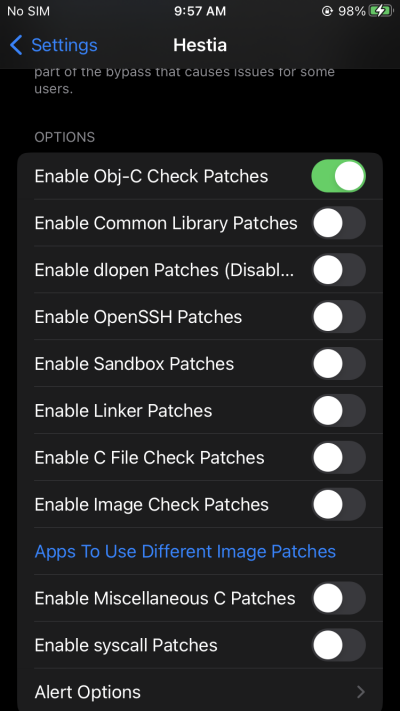

This will work in most cases, otherwise feel free to try other tweaks as well.
Method: 2
Using the default Jailbreak Bypass module that is available in Objection framework
i) Connect the target Application and execute the command shown below

Method: 3
Blindly trying out the publicly available Frida scripts for bypassing Jailbreak detection
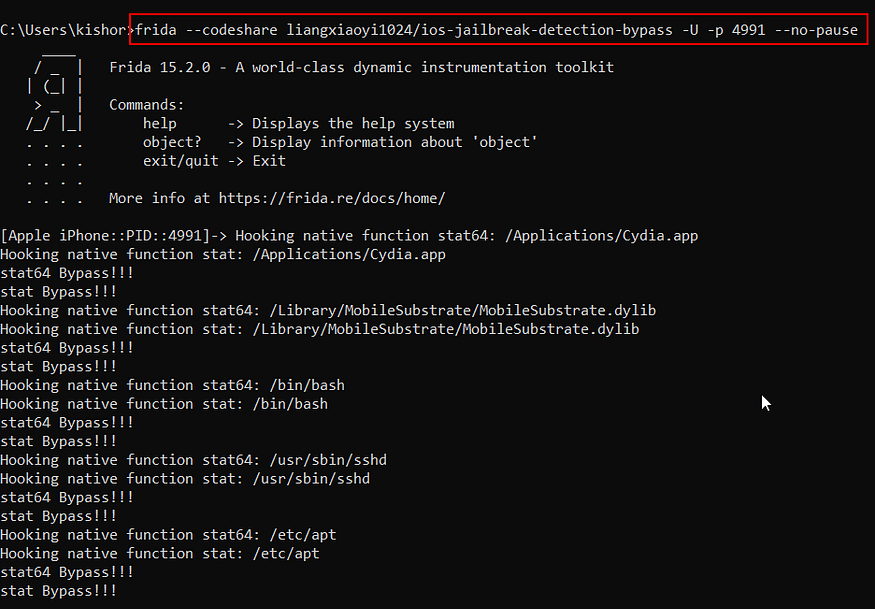
Here I used a publicly available script that was published in codeshare.
Frida Codeshare
Method: 4
Making our custom Frida Scripts for bypassing jailbreak Detection.
No coding exp? Don’t worry same goes here too lol
i) Connect the target application with objection and search for the Jailbreak detection classes
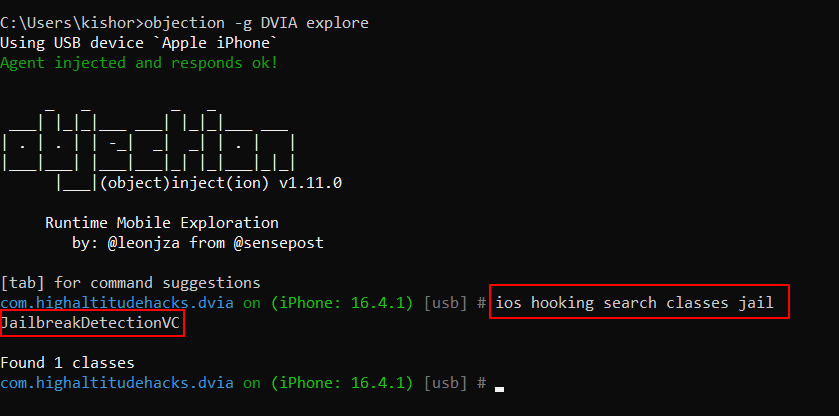
ii) Now enumerate the available methods in our target class

iii) Look for the Blask sheep xD
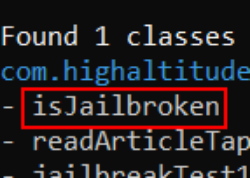
Aww there he is

iv) Now let’s make a simple script for Intercepting our target class
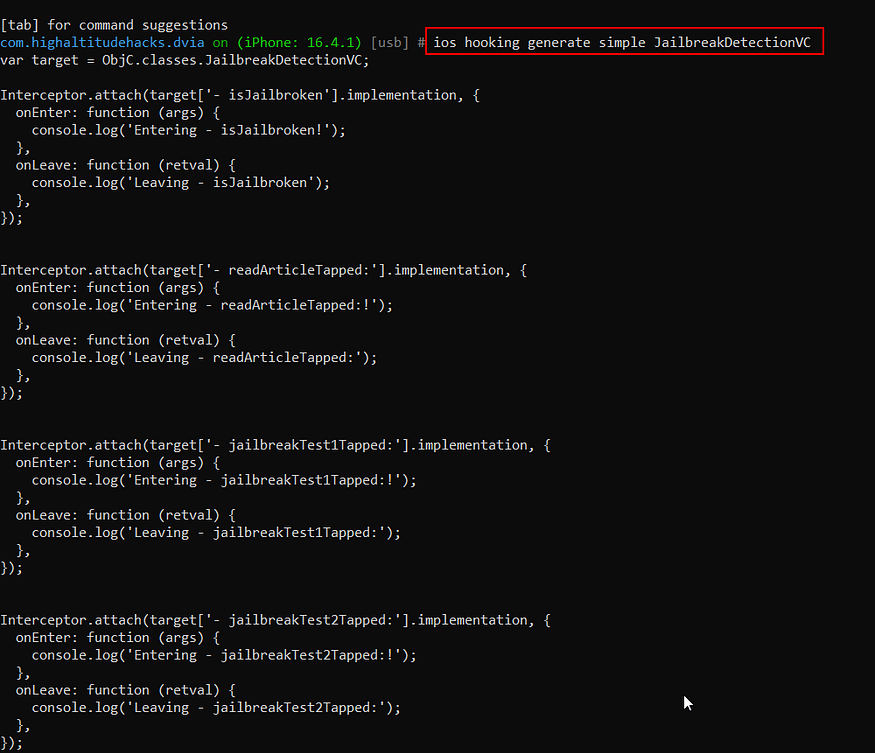
vi) Aww dear Objection made that this easy ❤
vii) However, the entire script is not required for us except the following small part.
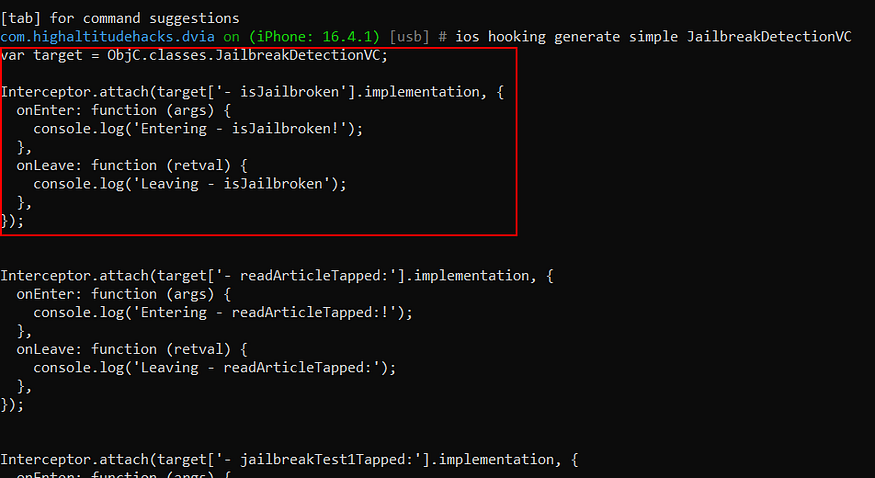
vii) Let’s modify the code to see what’s really happening with those target class method and save that code that as a JS file.

viii) Import the script in Objection and see what value returns when the jailbreak detection prompt appears
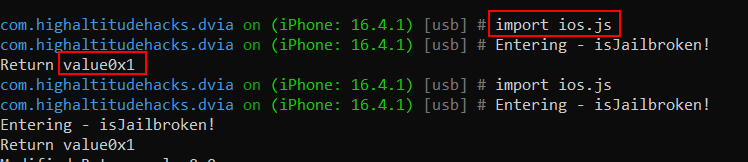
It looks like a Boolean data type and its returns 1 if the device is jailbroken
lx) Now let’s slightly modify the code for tampering the return value with 0

x) import the script again and see what happens when the jailbreak detection class gets loaded
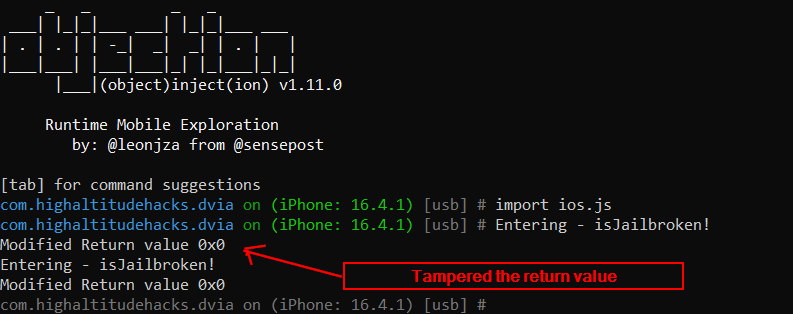
As you can see in the picture, with our custom Frida script, we were able to tamper the return value if is Jailbroken class method during the runtime.,
As a result, The Jailbreak detection will be bypassed.
2. Setting up the Proxy and Bypassing SSL Pinning
i) Setting up proxy
i. Fire up the Burp Suite and listen a port for all interfaces.
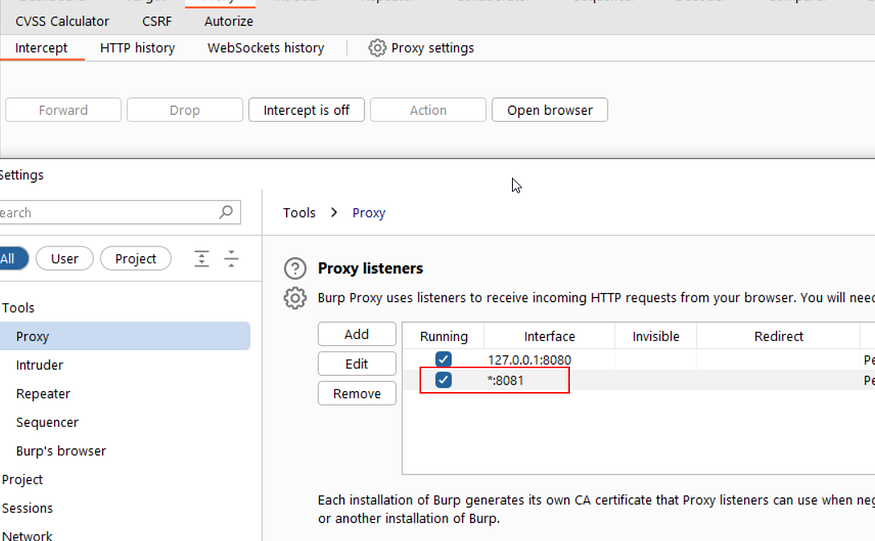
ii. Add the proxy details in the device Wi-Fi configuration
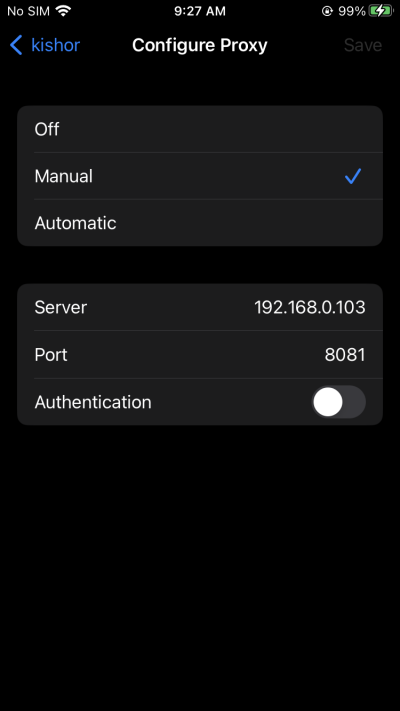
iii. Now go the device browser and hit “http://burp”
iv. Download the CA certificate
v. After downloading the certificate, Head to the device settings, there we can see “Profile Downloaded”
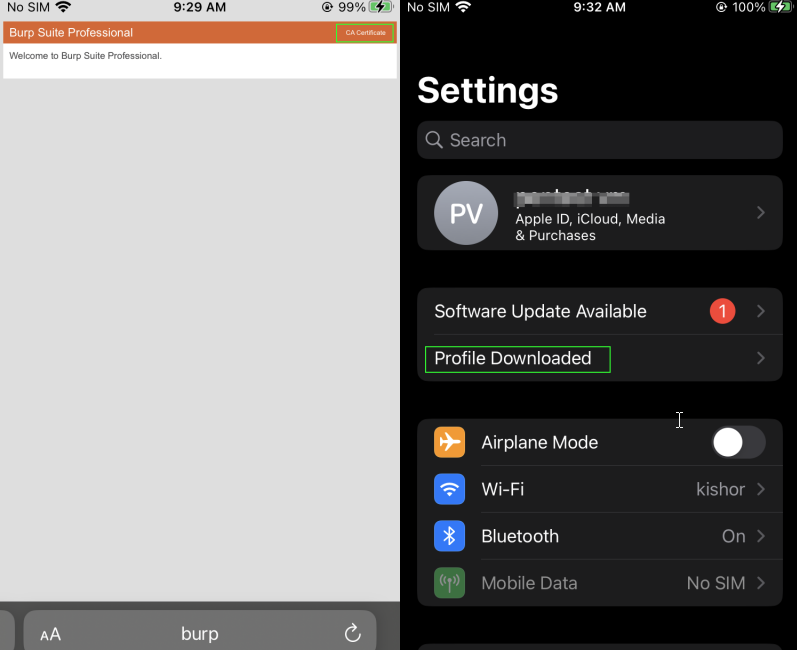
vi. Install the profile
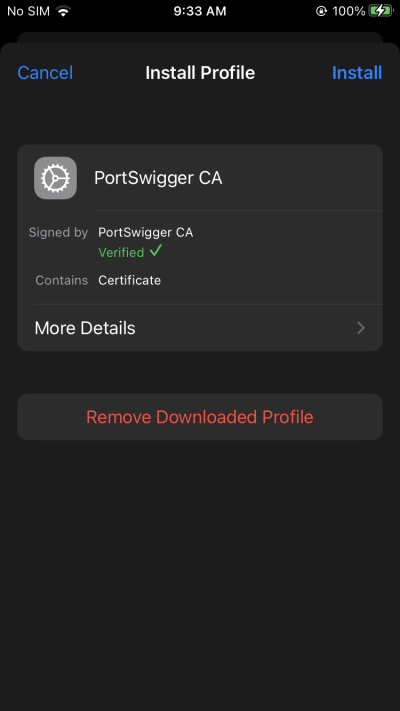
vii. Now from the settings, Search for “Trusted cert”, Grant Full trust.
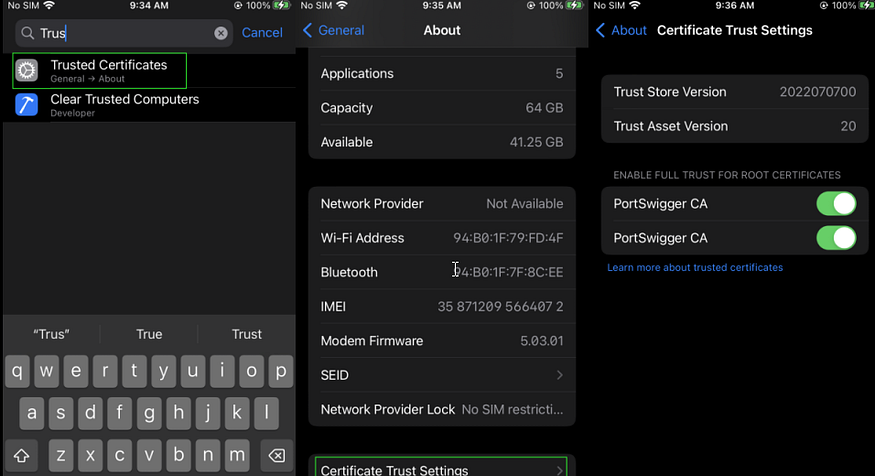
vii. Now we will be able to capture applications in which the SSL pinning is not enabled (Eg: Browser)
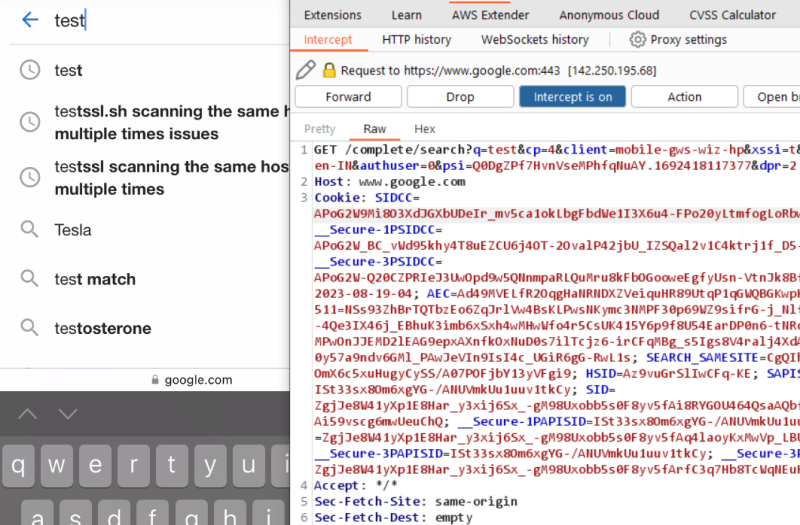
Ah, well, now it’s time for the true antagonist to make its grand entrance — SSL certificate pinning.
ii) How can we identify the chances of SSL certificate pinning?
i. After Configuring the Proxy, fire up the target application and play with it.
ii. The application may misbehave as it is getting messed up with our fake CA certificate (Burp)
iii. Take a look at the Burp dashboard and confirm this Error
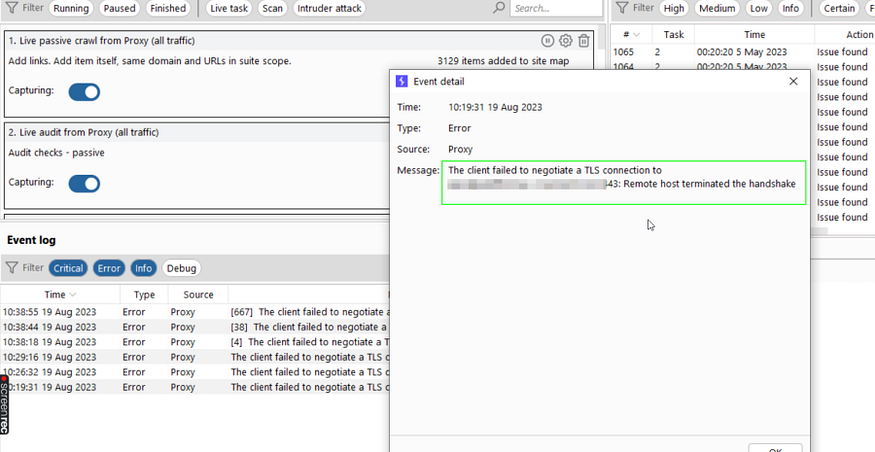
iv. This confirms the SSL pinning.
Now What? Let’s try to get rid of them with some iOS tweaks:
- SSLBypass
- SSL kill Switch
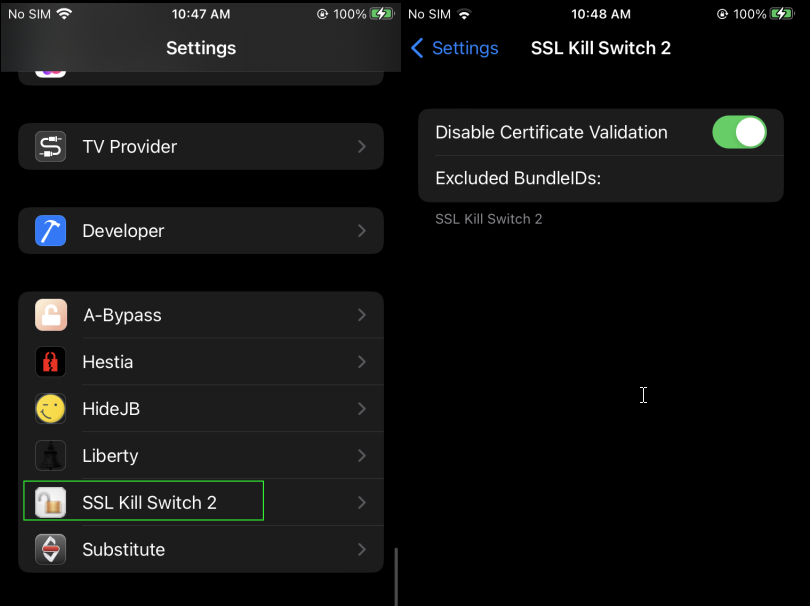
1. SSL Kill Switch
After enabling the SSL Kill switch, Restart the target application and make traffics.
2. SSLBypass
You can download the binary file from: SSLBypass/packages/com.evilpenguin.sslbypass_1.0–5+debug_iphoneos-arm.deb at main · evilpenguin/SSLBypass (github.com)
And install it manually.
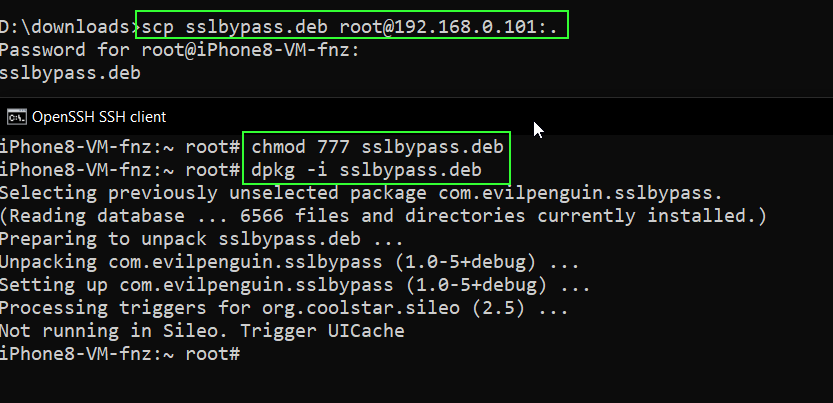
“Thats it! And mostly, like other ‘innocent’ tweaks, the application won’t bother showing up anywhere noticeable. Instead, it will be working its magic behind the scenes, all hush-hush. it’ll casually bypass the target application’s SSL pinning. ;)
• Similar to Android, we can also try the Frida scripts for bypassing SSL pinning:
1. https://codeshare.frida.re/@federicodotta/ios13-pinning-bypass/
2. https://codeshare.frida.re/@snooze6/ios-pinning-disable/
3. https://codeshare.frida.re/@machoreverser/ios12-ssl-bypass/
We can run the codeshare scripts as below:
frida -U --codeshare <project_name> -f <target_app_package_name>
3. Intercepting Flutter iOS applications
No Errors in the Burp dashboard and can’t Intercept???
Well then, it seems I detect the distinct aroma of the Flutter framework within your application.
i. Rename the app. ipa to app.zip and look inside
ii. Find the ‘frameworks’ folder and get inside
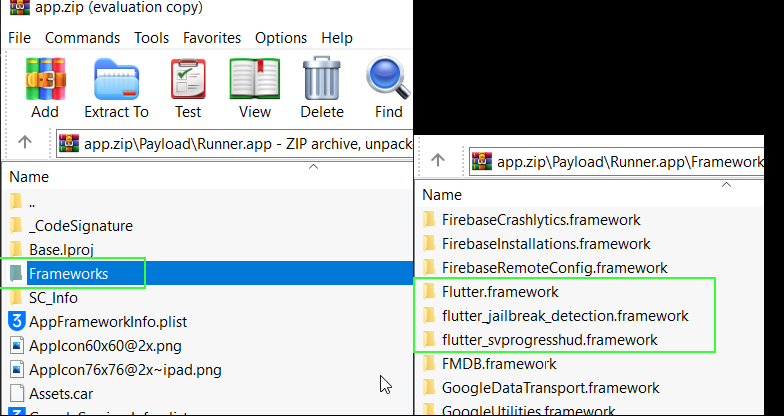
See, just as I oh-so-wisely predicted, this turned out to be one heck of a Flutter app…
Hope you remember what we just did in cases of an Android flutter application ( https://medium.com/@kishorbalan/its-all-about-android-ssl-pinning-bypass-and-intercepting-proxy-unaware-applications-91689c0763d8)
“Reflutter!!, We remember you”
Waste no time, reflutter the IPA
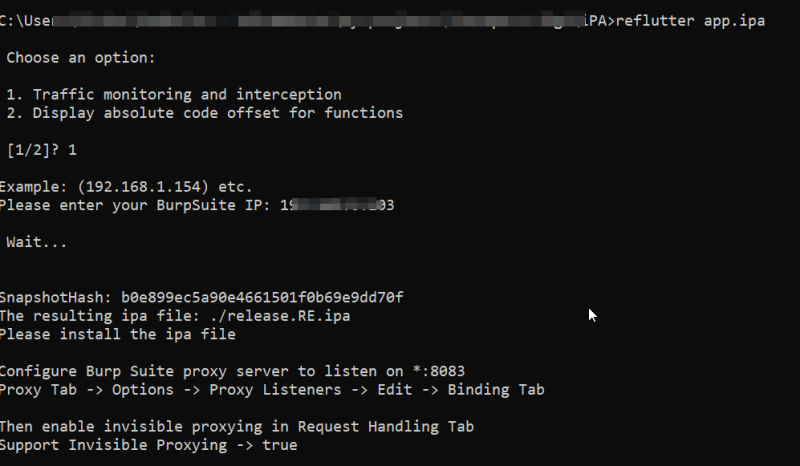
Thats it! Go install the IPA and capture the stuff.
FAQs
Jailbreak detection is a security mechanism that identifies whether an iOS device has been jailbroken. Many applications use it to prevent execution on potentially compromised devices.
During authorized security assessments, bypassing jailbreak detection allows testers to analyze application behavior, evaluate security controls, and identify vulnerabilities that would otherwise be inaccessible.
Security professionals commonly use tools such as Frida, Objection, Hestia, Liberty Lite, A-Bypass, and custom Frida scripts to bypass jailbreak detection during authorized penetration testing.
SSL pinning is a security technique that validates a server’s certificate against a trusted certificate embedded within the application, helping prevent man-in-the-middle (MITM) attacks.
In authorized security testing, bypassing SSL pinning allows testers to inspect encrypted network traffic, identify insecure API communications, and assess how sensitive data is transmitted.
Testers typically configure an intercepting proxy such as Burp Suite, install a trusted CA certificate on the device, and bypass SSL pinning when necessary to analyze encrypted application traffic.
Frida is a dynamic instrumentation framework that enables runtime analysis, function hooking, security control bypasses, and behavior modification of mobile applications during security assessments.
Flutter applications use their own networking framework, which may bypass traditional proxy interception. Specialized techniques and tools are often required to analyze their encrypted network traffic.
Burp Suite is a web security testing platform used to intercept, inspect, and modify application traffic, helping security professionals identify API vulnerabilities, insecure communications, and authentication flaws.
ValueMentor delivers comprehensive mobile application security testing for Android and iOS applications, combining manual penetration testing, runtime analysis, API security assessments, and secure code reviews to help organizations identify vulnerabilities and strengthen application security against evolving cyber threats.