In the ever-evolving landscape of digital workspaces, Office 365 has become a cornerstone for businesses globally. This comprehensive suite of applications has revolutionized the way organizations operate, fostering a dynamic and interconnected workplace. However, as businesses harness the power of Office 365 to propel their operations forward, the specter of cybersecurity threats looms ever larger. The intricate web of emails, documents, and collaborative tools within this ecosystem presents both a playground and a battleground for cyber adversaries. While it offers a powerful suite of tools for productivity and collaboration, overlooking security measures can lead to severe consequences.
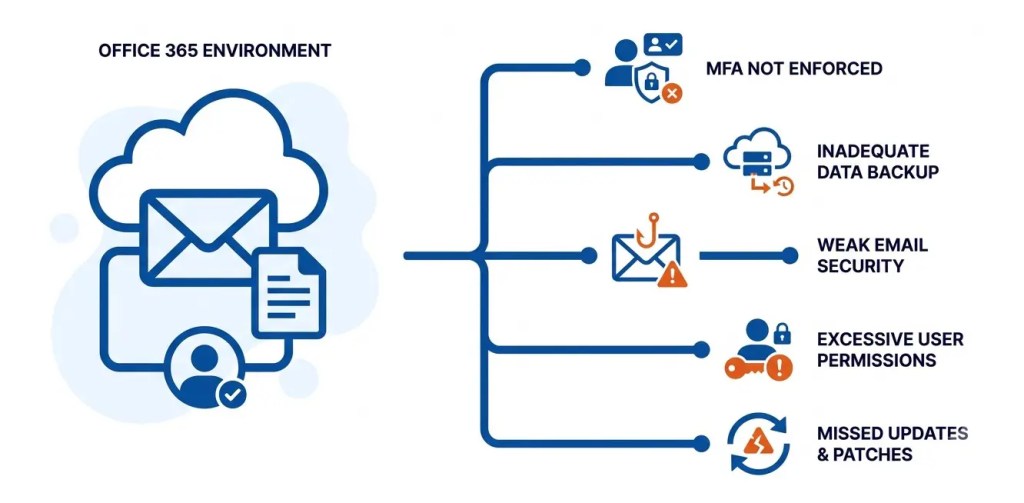
Security is not merely a checkbox on an IT to-do list; it is the bedrock upon which the digital infrastructure of an organization stands. In this blog post, we’ll explore five common Office 365 security mistakes that organizations often make and provide insights on how to avoid them.
Neglecting Multi Factor Authentication (MFA)
Neglecting Multi-Factor Authentication (MFA) poses a significant security risk as it leaves systems vulnerable to unauthorized access, emphasizing the importance of implementing this additional layer of protection for enhanced cybersecurity.
1. The Importance of MFA in the Digital Age
One of the most prevalent security oversights is neglecting the implementation of Multi-Factor Authentication (MFA). MFA adds an extra layer of protection by requiring users to provide multiple forms of identification before granting access. This can include a combination of passwords, biometrics, or one-time codes.
How to Implement MFA Effectively:
To avoid this mistake, organizations should enforce MFA for all Office 365 users. This can be achieved through Azure Active Directory settings, ensuring that even if a password is compromised, unauthorized access remains a formidable challenge.
2. Inadequate Data Backup and Recovery Planning
Neglecting a comprehensive data backup and recovery plan can leave organizations susceptible to data loss and operational disruptions in the face of unforeseen events. Establishing robust backup protocols is crucial for safeguarding critical information and ensuring a swift recovery in the event of system failures or cyber threats.
The Unpredictability of Data Loss:
Failing to establish a robust data backup and recovery plan is another common pitfall. Accidental deletion, malicious attacks, or system failures can lead to irreversible data loss, impacting business continuity.
Implementing a Comprehensive Backup Strategy :
To mitigate this risk, organizations should regularly back up critical data and ensure that the recovery process is well-documented and tested. Leveraging Office 365‘s built-in tools or integrating third-party solutions can help automate this process and provide a safety net against unforeseen data disasters.
3. Overlooking Email Security Measures
Overlooking email security measures exposes individuals and organizations to potential phishing attacks, data breaches, and other cyber threats. Prioritizing robust email security protocols, including encryption and user awareness training, is essential to mitigate risks and safeguard sensitive information.
Recognizing the Role of Email in Cybersecurity Threats:
Email remains a primary vector for cyber threats such as phishing, malware, and ransomware attacks. Overlooking email security measures is a significant mistake that can expose an organization to various risks.
Strengthening Email Security Protocols:
To enhance email security, organizations should implement advanced threat protection features within Office 365. This includes anti-phishing measures, email encryption, and regular employee training to recognize and report suspicious emails.
4. Poor User Permissions and Access Controls
Inadequate management of user permissions and access controls poses a serious security threat, as it increases the risk of unauthorized access to sensitive data and systems. Establishing and enforcing strict access policies is essential for safeguarding information and maintaining the integrity of organizational security frameworks.
The Dangers of Unrestricted Access:
Granting excessive permissions or overlooking access controls is a security mistake that can lead to unauthorized access and data breaches. It’s crucial to restrict access to sensitive information only to those who genuinely need it for their roles.
Implementing Role-Based Access Controls (RBAC):
To avoid this pitfall, organizations should adopt Role-Based Access Controls (RBAC) within Office 365. By defining roles and assigning permissions based on job responsibilities, businesses can ensure that employees have access only to the resources necessary for their tasks, reducing the risk of internal and external threats.
5. Failure to Regularly Update and Patch Systems
Failure to regularly update and patch systems leaves vulnerabilities unaddressed, exposing them to potential cyberattacks and security breaches. Timely and consistent system updates are critical in mitigating risks and ensuring that software and infrastructure remain resilient against evolving threats in the cybersecurity landscape.
The Role of Updates in Cybersecurity:
Failing to keep Office 365 applications, operating systems, and security tools up to date is a grave mistake. Updates and patches are released to address vulnerabilities and enhance the overall security posture of the software.
Establishing a Routine Update Schedule:
To prevent this oversight, organizations should establish a routine schedule for updating Office 365 applications and related systems. This includes staying informed about the latest security patches and promptly applying them to minimize the risk of exploitation by malicious actors.
Conclusion
In conclusion, securing your Office 365 environment is a multifaceted task that requires a proactive and comprehensive approach. By avoiding common security mistakes such as neglecting MFA, inadequate data backup planning, overlooking email security measures, poor user permissions, and neglecting updates, organizations can significantly enhance their resilience against evolving cyber threats. Regular training, robust policies, and a commitment to staying informed about the latest security best practices are essential components of a successful Office 365 security strategy. Remember, a secure digital workspace is not just a luxury but a necessity in the modern business landscape.
FAQs
What are the most common Office 365 security mistakes organizations make?
The most common mistakes include neglecting MFA, inadequate data backup and recovery planning, weak email security, excessive user permissions, and failure to regularly update and patch systems.
Why is Multi-Factor Authentication (MFA) important for Office 365 security?
MFA adds an additional layer of authentication beyond passwords, helping prevent unauthorized access even when a user’s password has been compromised.
Should MFA be enabled for all Office 365 users?
Yes. The blog recommends enforcing MFA across all Office 365 users to strengthen access security and reduce the risk of account compromise.
Why is data backup important for Office 365 environments?
A comprehensive backup strategy helps protect critical data against accidental deletion, malicious attacks, system failures, and other incidents that could disrupt business operations.
How can organizations improve email security in Office 365?
Organizations can strengthen email security by using advanced threat protection, anti-phishing controls, email encryption, and regular employee training to identify and report suspicious messages.
What risks are associated with excessive Office 365 user permissions?
Excessive permissions can allow users to access sensitive resources unnecessarily, increasing the potential impact of unauthorized access and data breaches.
How does Role-Based Access Control (RBAC) improve Office 365 security?
RBAC assigns permissions according to users’ job responsibilities, ensuring that employees have access only to the resources required for their roles and reducing unnecessary exposure.
Why should organizations regularly update and patch Office 365 systems?
Regular updates and patches address security vulnerabilities and help strengthen the security posture of Office 365 applications and related systems against potential exploitation.
How can organizations develop a stronger Office 365 security strategy?
Organizations should combine MFA, reliable backup and recovery processes, robust email security, least-privilege access controls, regular patching, employee training, and well-defined security policies.
What is the biggest risk of neglecting Office 365 security?
Neglecting security measures can expose organizations to unauthorized access, phishing, malware, ransomware, data loss, and business disruption, making proactive security essential for maintaining a resilient digital workplace.