Android’s permission model checks who performs an operation, never who asked for it. When a privileged app exposes a component that blindly carries out a sensitive action on behalf of any caller, an attacker holding zero permissions can use that privileged app as a deputy to reach data it could never touch directly. This post walks through the theory, the real-world disclosures, and a self-built proof of concept that follows the full attack chain — from an attacker to the malicious app they ship (PixelBoost, zero permissions) to the victim app they abuse (HealthTrack, holds photo permission) — to exfiltrate a gallery photo from the device.
1. The Core Bug: Identity vs. Intent
Android’s access control is fundamentally discretionary and identity-based: every permission check runs against the UID of the process making the call, enforced at the Binder/IPC layer. The OS has no concept of “on behalf of.”
Attacker App (no photo permission) -> [Intent / URI / IPC] -> Victim App (has photo permission) -> [ openInputStream(), openFile(), ContentResolver.query()] -> Protected Resource
The OS sees:
“Victim App is requesting this resource.”
The OS does not see:
“Victim App is doing this because an attacker asked it to.”
2. Does Scoped Storage Change Anything? (Android 10–12)
Mostly no — with one nuance worth getting right:
| Android Version | Possible? | Notes |
| Android 9 and below | Yes | Broad external storage access; easiest path-based attacks |
| Android 10 (API 29) | Yes | Scoped Storage introduced but opt-out available via requestLegacyExternalStorage |
| Android 11 (API 30) | Yes | Scoped Storage enforced; legacy flag ignored once an app targets API 30+ |
| Android 12 (API 31) | Yes | Same trust-boundary issue; enforcement unchanged from 11 |
| Android 13+ (API 33) | Yes | Granular media permissions narrow what is exposed, not whether the deputy pattern works |
Scoped Storage restricts what an app can reach by direct file path. It does nothing to stop an app from calling ContentResolver.openInputStream(uri) / openFile(uri) against a content:// Uri handed to it by another process — and that is exactly the API surface every confused-deputy case below abuses. Confused Deputy is not a storage-permission bug. It is a trust-boundary bug.
4. Proof of Concept: The Full Attack Chain
To make this concrete, the PoC follows the attack the way it actually unfolds — three actors in sequence:
1. The attacker. A developer who wants gallery photos off a target device but knows that any app requesting media permissions invites suspicion. So they never request one. Instead, they ship a believable, permissionless app and let a legitimate app do the privileged read for them.
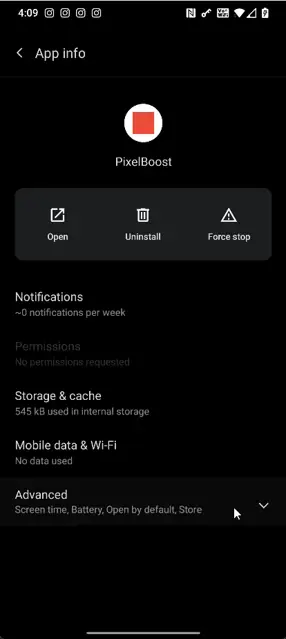
2. The malicious app — PixelBoost (com.poc.pixelboost). The attacker’s deliverable. A fake photo-enhancement app holding zero storage/media permissions. It first proves it cannot read a gallery photo on its own, then obtains that exact photo anyway by routing the request through a privileged deputy.
3. The victim app — HealthTrack (com.poc.healthtrack). A fictional personal-health app that legitimately holds READ_EXTERNAL_STORAGE because it lets users attach a report photo to their record. It exposes an activity that reads any caller-supplied Uri using its own permission grant and hands the result back — without ever asking whether the caller was entitled to that data. This is the confused deputy.
4.1 The victim app’s vulnerable manifest

android:exported=”true” plus a public, undocumented-but-guessable action string is all it takes to make this activity reachable from any app on the device, signature or no signature.
4.2 The targeted app’s vulnerable code
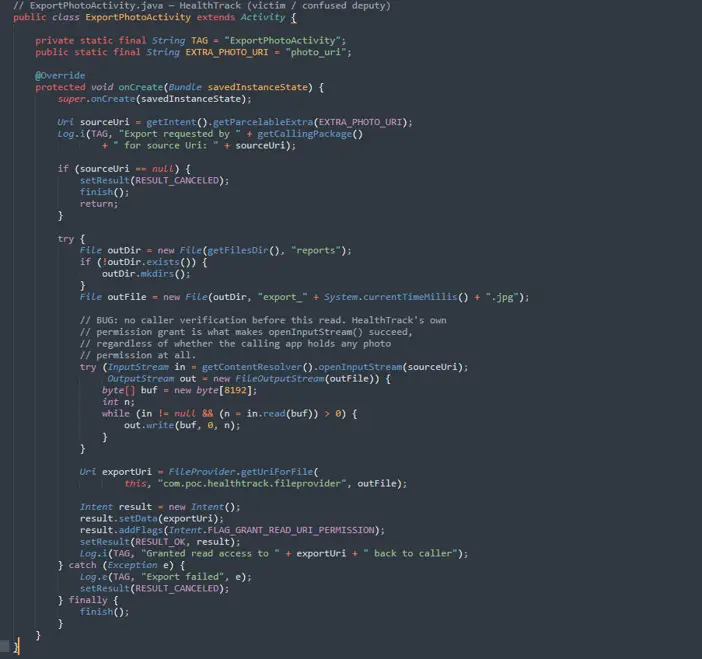
Notice what is missing: no getCallingPackage() allow-list check, no signature verification, no confirmation dialog before the read. getCallingPackage() is even logged — the developer clearly had the caller’s identity in hand and simply never used it for an authorization decision.
4.3 The malicious app’s exploit code

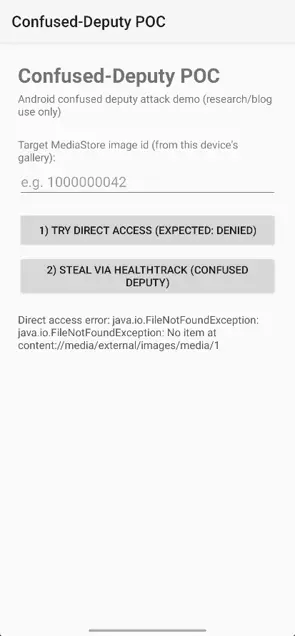
The attacker app proves it can’t read a photo directly (tryDirectAccess → SecurityException), then asks HealthTrack to read it instead (tryViaHealthTrack).
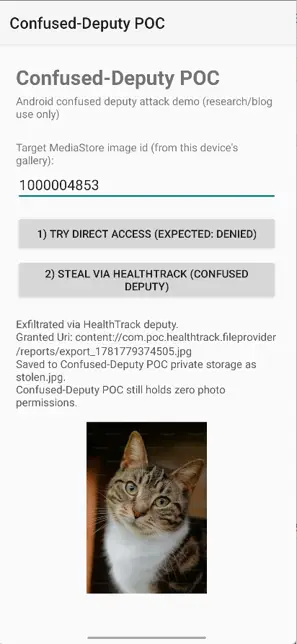
The attacker app proves it can’t read a photo directly (tryDirectAccess → SecurityException), then asks HealthTrack to read it instead (tryViaHealthTrack). HealthTrack has the permission and doesn’t check who’s calling, so it fetches the photo and hands back a URI tagged FLAG_GRANT_READ_URI_PERMISSION — which lets PixelBoost open it in onActivityResult. It never gained a permission; it borrowed the deputy’s. That’s the confused deputy.
4.5 Reproducing it
1. Install both HealthTrack, PixelBoost-attacker app on same device.
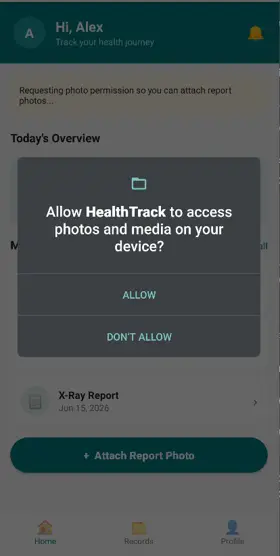
2. Open HealthTrack once and grant the photo permission when prompted (a real app would request this the same way).
4. Photos on device galley.

3. Open PixelBoost and enter a valid _id from the query above (Zero Permission)
4. Tap “Try direct access” — denied with a SecurityException; the malicious app holds no media permission.
5. Tap “Steal via HealthTrack” — the photo renders in PixelBoost’s ImageView. A copy is also written to its own private storage (stolen.jpg), proving persistent exfiltration into a process that was never granted any photo permission.
5. Mitigations
1. Verify the calling package, not just the data. Use Activity.getCallingPackage() / getCallingActivity() and check the caller’s identity (and ideally signature) before performing a sensitive operation triggered by an incoming Intent, especially on exported components.
2. Avoid unnecessary exported components. Activities, services, and providers that don’t need to be reachable from other apps should set android:exported=”false”. Where export is required, protect it with a signature-level custom permission.
3. Never trust attacker-controllable metadata. Filenames, display names, and paths returned by a Uri are not safe to use verbatim when writing files. Canonicalize the resulting path and verify it stays within the intended directory before any write — this is what would have prevented Dirty Stream.
4. Scope Uri grants narrowly. Prefer FLAG_GRANT_READ_URI_PERMISSION on a specific Uri over broad or persistent grants, and avoid forwarding a Uri received from one app on to another without re-validating it.
5. Treat all Intent extras as untrusted input — including ones from your own “trusted” picker flows. The picker can be replaced by any app that declares a matching intent-filter.
6. Copy-then-validate, don’t stream-then-trust. When consuming an InputStream from an external Uri, read into a sandboxed buffer or file first, validate type/size/path, and only then move it into a privileged location.
6. Conclusion
The confused deputy isn’t a bug in any one API — it’s a consequence of how Android decides who’s allowed to do what. Every permission check answers “does the app making this call hold the permission?” and never “should this app be making this call on someone else’s behalf?” As long as that second question goes unasked, any app that performs a sensitive action on caller-supplied input is a deputy waiting to be confused.
That’s why the pattern outlives every mitigation thrown at it. Scoped Storage, granular media permissions, mandatory exported declarations, and FileProvider all narrow what leaks and how, but none of them close the gap the PixelBoost-to-HealthTrack chain walks through: a permissionless app borrowing a privileged app’s authority just by asking nicely. The same root cause has surfaced in billion-install file managers, office suites, wallet SDKs, and OEM system apps disclosed and patched each time, then reintroduced somewhere new. The fix is equally straightforward, and it lives in the deputy, not the platform: verify the caller, validate the URI, scope the grant, and treat every incoming intent as hostile. Holding a permission is a responsibility to check who’s asking before you act on it—not a license to act on anyone’s behalf. Until exported components are written that way, “I have the permission” will remain all an attacker needs.
FAQs
It is an attack where a permissionless app tricks a privileged app into performing a sensitive operation on its behalf, bypassing Android’s permission model entirely.
2. Why can’t Android’s permission model prevent this attack?
Because Android enforces permissions based on the identity of the app performing the operation, not the app that supplied the request. The OS doesn’t automatically check the original caller, a privileged app must explicitly verify the caller and scope access itself, or it ends up acting on an untrusted app’s behalf.
3. Does Scoped Storage fix the Confused Deputy vulnerability?
No. Scoped Storage restricts direct file path access but does nothing to prevent a privileged app from calling ContentResolver.openInputStream() on a URI supplied by an untrusted caller.
4. What makes an app a “confused deputy”?
Any exported app component that performs a sensitive action on caller-supplied input without verifying who the caller is becomes a confused deputy.
5. How did PixelBoost steal a photo without any permissions?
It sent an Intent to HealthTrack — which held photo permissions — with a target URI. HealthTrack read the photo using its own permissions and returned it to PixelBoost without checking who was asking.
6. What is the single most effective mitigation against this attack?
Verify both who the caller is and whether they’re actually allowed to access what they’re asking for using Binder.getCallingUid() together with checkUriPermission() before performing any sensitive operation triggered by an incoming Intent. Checking the caller’s package name alone isn’t enough, since identity doesn’t prove the caller is entitled to the resource.
7. Why is android:exported=”true” dangerous on sensitive components?
It makes the component reachable by any app on the device, with no signature or permission requirement, giving attackers a direct entry point to abuse the component.
8. Are Intent extras safe to trust from other apps?
No. All Intent extras must be treated as untrusted input, including those from picker flows, since any app declaring a matching intent-filter can intercept or replace them.
9. Has this attack pattern appeared in real-world apps?
Yes. The same root cause has been found and patched in widely used file managers, office suites, wallet SDKs, and OEM system apps — and repeatedly reintroduced in new components.
10. Where does the responsibility to fix this lie — the app or the platform?
The app. The platform will not close this gap automatically. Every exported component must independently verify the caller, validate the URI, and scope grants narrowly before acting.