- DASA (Desktop Application Security Assessment) is the App Defense Alliance’s assurance profile for native desktop software running on Windows, macOS, and Linux.
- Two assurance tiers apply: AL1 is a verified self-assessment built on required automated scan artifacts and documented evidence; AL2 is a hands-on, lab-executed technical assessment performed by an ADA-authorized testing lab.
- Core desktop-specific risk areas assessed under DASA include code signing and binary integrity, secure update/patch delivery, DLL/dylib/shared-library hijacking (search-order and side-loading risks), local privilege escalation, inter-process communication (IPC) hardening, and local credential and secrets storage.
- Testing methodology typically spans static analysis (SAST) against source or compiled binaries, dynamic analysis (DAST) against the running application, and configuration audits benchmarked against OWASP ASVS control families and CIS Benchmarks for the underlying OS.
- Cross-platform products (Windows + macOS + Linux builds) generally require per-OS scoping, since installer mechanics, sandboxing models, and privilege boundaries differ materially between platforms.
- Source code access requirements vary by finding type and depth of testing agreed in scope — it is not universally required or universally excluded.
Get a scoped DASA readiness breakdown before you commit to a full assessment window.
Desktop applications face unique security risks due to their direct interaction with operating systems, local resources, and software update mechanisms. To address these challenges, the App Defense Alliance (ADA) introduced the Desktop Application Security Assessment (DASA), a standardized framework for evaluating the security of native Windows, macOS, and Linux applications.
Whether you’re preparing for certification or strengthening your software’s security posture, understanding DASA’s assessment process is essential. This guide explores its assurance levels, key testing areas, and best practices to help organizations achieve DASA readiness.
What Is DASA and Why It Exists for Desktop Software
Mobile and cloud-delivered software have had structured third-party assurance profiles under the App Defense Alliance for some time — MASA for mobile, CASA for cloud/SaaS. DASA extends that same authorized-lab assurance model to installed desktop applications, where the attack surface is fundamentally different: local filesystem access, OS-level privilege models, native IPC channels, and update mechanisms that, if compromised, can lead to supply-chain-style compromise of every installed instance.
If your product ships as an .exe/.msi, .app/.pkg/.dmg, or .deb/.rpm/AppImage, DASA is the profile your enterprise customers, procurement teams, and platform partners are increasingly going to ask about by name.
AL1 vs. AL2: What Each Assurance Level Actually Verifies
A common misconception is treating AL1 as “just paperwork.” That’s inaccurate and worth correcting up front, because it changes how engineering teams should prepare.
Assurance Level 1 (AL1) — Verified Self-Assessment
AL1 is a self-assessment that must be substantiated with required automated scan artifacts — meaning your team runs specified scanning tooling (SAST/dependency scanning, configuration checks) and submits the resulting evidence alongside declarative answers. It is reviewed for completeness and consistency, not merely collected. Gaps between declared answers and submitted scan output are a common rejection reason.
Assurance Level 2 (AL2) — Lab-Executed Technical Assessment
AL2 requires hands-on verification performed by an ADA-authorized testing lab. This includes manual testing of the areas automated scanners routinely miss: business logic around local privilege boundaries, IPC message validation, update-signature verification logic, and platform-specific hardening (e.g., macOS entitlements, Windows ACLs, Linux capability sets). AL2 findings are typically deeper, fewer in count, and harder to remediate without engineering involvement.
ValueMentor Assessment Insight (Common Assessment Pattern): Products that pass automated dependency and SAST scans cleanly for AL1 frequently still surface AL2-level findings in update-delivery signature validation and IPC input handling — these are logic-level issues that static tooling alone does not reliably catch, and typically require a hands-on assessor to confirm exploitability.
Core Desktop-Specific Risk Areas Under DASA Scope
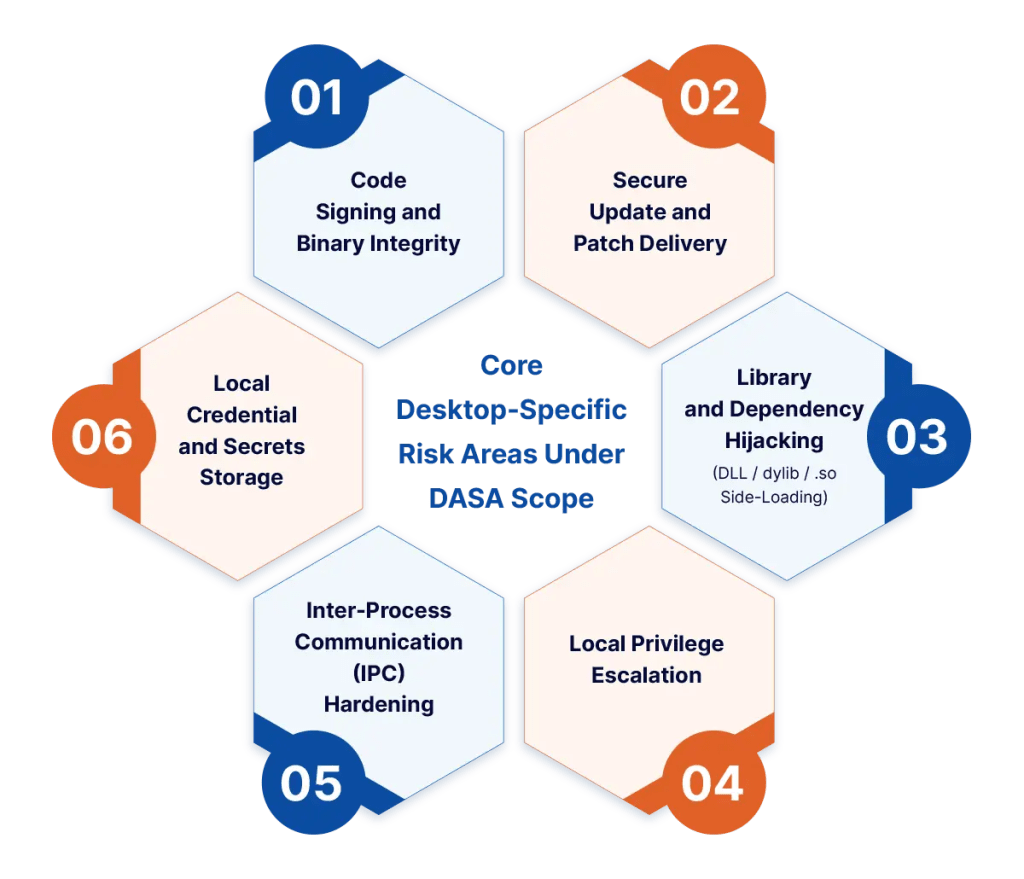
1. Code Signing and Binary Integrity
Assessors check whether installers and executables are signed with a valid, non-expired certificate for the target OS (Authenticode on Windows, Apple Developer ID/notarization on macOS, and package-level signing conventions on Linux distributions), and whether the application verifies its own binary integrity at launch where applicable.
2. Secure Update and Patch Delivery
This is one of the highest-impact DASA areas because a broken update mechanism can turn a single vulnerability into a mass-compromise vector. Assessment covers transport security (TLS enforcement, certificate pinning where used), update package signature verification prior to installation, and rollback/downgrade protection.
3. Library and Dependency Hijacking (DLL / dylib / .so Side-Loading)
Search-order hijacking on Windows, dylib injection on macOS, and LD\_PRELOAD/library path manipulation on Linux are tested by examining how the application resolves and loads shared libraries, and whether writable directories exist earlier in the search path than trusted system locations.
4. Local Privilege Escalation
Assessors review services, scheduled tasks, setuid binaries, or elevated helper processes the application installs, checking for insecure permissions, unsafe IPC exposure to lower-privileged processes, or improper de-escalation after installer completion.
5. Inter-Process Communication (IPC) Hardening
Named pipes, Mach ports, D-Bus interfaces, sockets, and custom protocol handlers are examined for authentication, input validation, and whether any local process (not just the application itself) can invoke privileged functionality.
6. Local Credential and Secrets Storage
This covers whether tokens, API keys, and session credentials are stored using OS-native secure storage (Windows DPAPI/Credential Manager, macOS Keychain, Linux Secret Service/libsecret) versus plaintext config files or unencrypted local databases.
Get a checklist mapped to your specific OS build targets before scoping.
Testing Methodology: SAST, DAST, and Configuration Audits
DASA assessments typically combine three testing pipelines:
- Static Analysis (SAST): Source-available or reverse-engineered binary analysis to catch insecure API usage, hardcoded secrets, and unsafe deserialization patterns, generally scoped against OWASP ASVS control families relevant to authentication, session management, and data protection.
- Dynamic Analysis (DAST): Runtime instrumentation of the installed application — monitoring file system writes, registry/plist changes, network calls, and IPC traffic while the assessor exercises core workflows and edge cases (e.g., forced update failures, malformed IPC payloads).
- Configuration Audits: Benchmarking the application’s interaction with the host OS against CIS Benchmarks for the relevant platform (e.g., are file permissions set per least-privilege, are unnecessary services left listening).
While OWASP MASVS is written specifically for mobile applications, several of its verification concepts — particularly around local data storage and cryptographic key handling — are conceptually mirrored in how desktop credential storage is assessed, even though MASVS itself is not the governing standard for DASA.
Assessment Area Reference Table
| Assessment area | Relevant requirement or control | What the assessor tests or reviews | Evidence the development team should provide | Common failure pattern | Recommended pre-assessment action |
| Code signing & binary integrity | Valid platform-specific code signing (Authenticode / Developer ID+notarization / package signing) | Signature validity, certificate chain, self-integrity checks at launch | Signed build artifacts, certificate details, notarization logs (macOS) | Expired or ad-hoc signing certificates used in production builds | Confirm signing pipeline runs on the exact release artifact, not a dev build |
| Secure update mechanism | Signed, integrity-verified update delivery over enforced TLS | Update package signature verification, downgrade/rollback protection, transport security | Update flow documentation, signature verification code path, TLS configuration | Update client accepts unsigned or downgraded packages | Test update rejection behavior with a tampered/unsigned package before assessment |
| Library/dependency loading | Safe library search-order and load-path handling | DLL/dylib/.so search order, writable-path exposure, `LD\\\_PRELOAD` handling | List of loaded libraries and load paths per OS build | Writable directory earlier in search path than trusted system paths | Run a library-loading trace on a clean install per OS |
| Local privilege boundaries | Least-privilege service/helper design | Permissions on installed services, scheduled tasks, elevated helpers | Service manifests, installer privilege model documentation | Elevated helper process exposes IPC to standard-privilege processes | Document exactly which components run elevated and why |
| Inter-process communication | Authenticated, validated IPC channels | Named pipes, D-Bus, sockets, custom protocol handlers | IPC interface documentation, message schema | Unauthenticated local socket accepts commands from any process | Add sender authentication/validation to all local IPC endpoints |
| Local credential/secrets storage | OS-native secure storage usage | Where and how tokens, keys, and sessions are persisted | Storage architecture diagram, dependency on OS keychain/DPAPI/libsecret | Tokens or session data stored in plaintext config/local DB | Migrate secrets to OS-native secure storage before assessment |
Ready to see how your current build maps against these areas?
Cross-Platform Scoping: Why “One DASA Assessment” Isn’t One Test
Because installer mechanics, privilege models, and OS security primitives differ across Windows, macOS, and Linux, a cross-platform desktop product generally needs per-OS test planning even under a single DASA engagement. A Windows-specific finding (e.g., insecure ACLs on an installed service) does not imply anything about the macOS build’s entitlement configuration or a Linux package’s setuid handling. Assessors typically scope:
- Installer/uninstaller behavior per OS packaging format
- Update client behavior per platform (may share a core library but differ in OS-level enforcement)
- Privilege and sandboxing model per OS (Windows UAC/ACLs, macOS entitlements/sandbox/notarization, Linux capabilities/AppArmor/SELinux where applicable)
- IPC mechanisms, which are frequently OS-specific implementations even when the application logic is shared
On Source Code Access
Source code access requirements are scope-dependent rather than absolute. Some AL2 findings (e.g., confirming update signature verification logic, or tracing a credential-storage code path) are faster and more precise to verify with source access. Others (e.g., binary signing verification, library load-order testing, runtime IPC fuzzing) can be performed against compiled artifacts without source. Teams with source-access constraints should raise this during scoping so the test plan is built around available access rather than assumed after the engagement starts.
Conclusion
DASA certification demonstrates a strong commitment to securing desktop applications against evolving cyber threats. By addressing security gaps before formal assessment, organizations can reduce risk, streamline certification, and build greater trust with customers and partners.
ValueMentor helps organizations assess DASA readiness, identify vulnerabilities, and prepare Windows, macOS, and Linux applications for successful certification through comprehensive security assessments and expert guidance.
Frequently Asked Questions
Does passing AL1 mean automated checks alone are sufficient for DASA?
No. AL1 is a verified self-assessment requiring automated scan artifacts as evidence, but it does not replace the hands-on verification performed under AL2 for logic-level and platform-specific risks.
Does a single DASA assessment cover Windows, macOS, and Linux automatically?
Not by default. Cross-platform products typically require per-OS scoping because installer, privilege, and IPC mechanisms differ by platform.
Is source code required for a DASA assessment?
It depends on which findings need to be verified and the depth of testing agreed in scope. It is not a blanket requirement, nor is it always excluded.
Who issues the final DASA certificate?
Certification issuance is handled through the App Defense Alliance’s certification process; an authorized testing lab performs the assessment and evidence verification that feeds into that process.
Preparing for a DASA Engagement
If your team is scoping a DASA assessment across Windows, macOS, and/or Linux builds, the practical next step is a scoping conversation that maps your specific installer architecture, update mechanism, IPC surface, and credential storage approach to the assessment areas above — before committing to a testing window.
Book a DASA readiness assessment and scoping call. You’ll receive a preliminary scope breakdown covering which OS builds require dedicated test planning, where source access would materially speed up verification, and which of the risk areas above are most likely to need remediation attention based on your current architecture.