- MASA (Mobile Application Security Assessment) is the App Defense Alliance’s mobile-specific assessment track under the Independent Security Review program, aligned to OWASP MASVS (Mobile Application Security Verification Standard).
- Two assurance tiers exist: AL1 (a verified self-assessment package containing required automated scan artifacts, not a hands-on lab test) and AL2 (in-depth, hands-on lab verification performed by an ADA-authorized assessor against MASVS controls).
- Scope covers both Android and iOS builds, including platform-specific storage, cryptography, network communication, authentication, and binary protection controls.
- Development teams need an evidence pack: SAST/DAST reports, dependency and SBOM data, build configuration exports, and (for AL2) lab-accessible test builds.
- An ADA-authorized lab performs AL2 testing and evidence validation; the lab does not issue the final certification or badge — that remains an ADA/Google-managed outcome.
- ValueMentor supports the readiness assessment, MASVS-aligned technical testing, evidence review, and finding validation workflow ahead of and during MASA submission — verify current authorized-lab status for the applicable profile before relying on it for a specific engagement.
Ready to see where your current mobile security testing stands against MASA scope? Request a MASA readiness scoping call — you’ll get a control-by-control gap breakdown against your existing pentest or SAST/DAST results before you touch the ADA submission portal.
As mobile applications increasingly handle sensitive business and customer data, security assurance has become a critical requirement not just for compliance, but for building trust. The Mobile Application Security Assessment (MASA), developed under the App Defense Alliance (ADA), provides a standardized framework for evaluating Android and iOS applications against the OWASP Mobile Application Security Verification Standard (MASVS).
This blog explains how MASA works, the differences between AL1 and AL2 assurance levels, the security controls assessed, and how organizations can prepare for a successful assessment.
What MASA Actually Verifies (and What It Doesn’t)?
MASA is one of the assessment tracks under the App Defense Alliance’s Independent Security Review initiative, alongside the SaaS-oriented CASA framework. MASA specifically targets mobile applications distributed through app stores that participate in ADA-recognized programs. The technical baseline is OWASP MASVS, with test procedures drawn from the OWASP Mobile Application Security Testing Guide (MASTG).
MASA does not:
- Validate every privacy declaration an app makes in its app-store listing.
- Certify that an application carries zero risk or that all application-layer vulnerabilities have been eliminated.
- Get issued by the testing lab — the lab performs assessment and evidence validation; certification status is administered through the App Defense Alliance / Google process.
MASA does:
- Verify that the mobile application meets a defined subset of MASVS controls at the assurance level selected (AL1 or AL2).
- Produce evidence artifacts (scan outputs, lab test results, remediation validation records) that feed into the ADA submission workflow.
AL1 vs. AL2: Where the Assessment Effort Actually Goes
| Dimension | AL1 | AL2 |
| Assessment method | Verified self-assessment package containing required automated scan artifacts (SAST/DAST/dependency scan outputs) | In-depth, hands-on lab verification by an ADA-authorized assessor |
| Who executes testing | Development/security team runs the required tooling; artifacts are reviewed and verified | ADA-authorized lab executes manual and automated testing directly against the build |
| Typical scope depth | Control coverage confirmed via automated tooling output and self-attestation, subject to verification | Manual test cases for business logic, authentication flows, cryptographic implementation, and platform-specific storage that automated tooling frequently misses |
| Evidence artifact type | Automated scan reports, configuration exports, self-assessment questionnaire responses | Lab test reports, proof-of-concept validation, retest/remediation confirmation records |
| Common use case | Lower-risk applications or early-stage compliance posture building | Applications handling sensitive data categories, financial transactions, health data, or higher app-store risk tiers |
A frequent misunderstanding: AL1 is sometimes described as “documentation only.” That’s inaccurate — AL1 requires actual automated scan artifacts (not narrative claims) that a verifier reviews for completeness and consistency against MASVS control mappings. The distinction from AL2 is who performs the deeper manual verification, not whether evidence is required at all.
MASVS Control Domains in Scope for Mobile Assessment
MASTG/MASVS organizes controls into domains that map directly onto what an assessor — whether reviewing AL1 artifacts or executing AL2 lab testing — will examine:
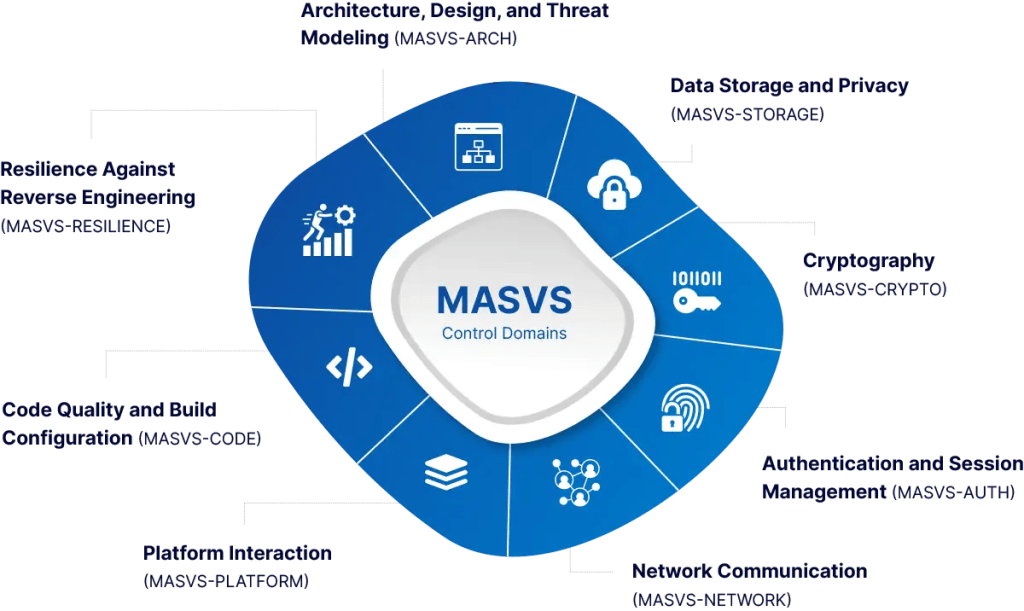
Architecture, Design, and Threat Modeling (MASVS-ARCH)
Reviewed primarily through documentation and design artifacts: data flow diagrams, third-party SDK inventory, and threat model coverage for the mobile client’s attack surface.
Data Storage and Privacy (MASVS-STORAGE)
Tested via static analysis of local storage mechanisms (SharedPreferences/Keychain misuse, unencrypted SQLite databases, world-readable files) and dynamic inspection of runtime memory for sensitive data retention.
Cryptography (MASVS-CRYPTO)
Assessed for weak or deprecated algorithm usage, hardcoded keys, improper key storage (outside Android Keystore / iOS Secure Enclave), and custom crypto implementations that bypass platform-provided primitives.
Authentication and Session Management (MASVS-AUTH)
Manual test cases target session token handling, biometric authentication bypass paths, and improper reliance on client-side authentication logic — an area automated scanners frequently under-report.
Network Communication (MASVS-NETWORK)
Configuration audits against certificate pinning implementation, TLS configuration, and cleartext traffic permissions (Android Network Security Config, iOS ATS exceptions).
Platform Interaction (MASVS-PLATFORM)
Covers IPC mechanisms (intents, deep links, custom URL schemes), WebView configuration (JavaScript bridge exposure), and permission scoping against least-privilege expectations.
Code Quality and Build Configuration (MASVS-CODE)
Static analysis for injection flaws, unsafe deserialization, and build-time misconfigurations such as debug flags, verbose logging, or exposed API keys in compiled binaries.
Resilience Against Reverse Engineering (MASVS-RESILIENCE)
Applicable primarily at higher assurance expectations: anti-tampering, root/jailbreak detection, obfuscation effectiveness, and anti-debugging controls — tested through both static binary analysis and dynamic instrumentation.
Across mobile assessments generally, MASVS-STORAGE and MASVS-NETWORK findings are frequently identified earlier in the testing cycle than MASVS-RESILIENCE or MASVS-AUTH issues, because storage and network misconfigurations are more readily surfaced through static analysis and configuration audits, while authentication logic flaws and resilience gaps typically require manual, hands-on test cases to uncover. Development teams preparing for AL2 assessment should expect proportionally more assessor time allocated to authentication flow testing and binary resilience checks than to storage/network review.
Not sure where your build currently stands against these domains? Get a control-mapped gap assessment — you’ll receive a domain-by-domain breakdown showing which MASVS areas your existing pentest or SAST/DAST coverage already satisfies and which require dedicated MASA-aligned testing.
Assessment Area Breakdown: Controls, Evidence, and Failure Patterns
| Assessment area | Relevant requirement or control | What the assessor tests or reviews | Evidence the development team should provide | Common failure pattern | Recommended pre-assessment action |
| Local data storage | MASVS-STORAGE-1, MASVS-STORAGE-2 | Static inspection of local databases, shared preferences, cache files, and clipboard handling for sensitive data exposure | SAST report scoped to storage APIs; data classification map showing what sensitive data touches local storage | Sensitive tokens or PII cached in plaintext SQLite or shared preferences without encryption | Run a static scan targeting storage API usage before submission and encrypt any locally persisted sensitive fields |
| Cryptographic implementation | MASVS-CRYPTO-1, MASVS-CRYPTO-2 | Review of algorithm selection, key length, key storage location, and custom cryptography usage | Cryptography inventory listing algorithms, key management approach, and platform keystore integration | Hardcoded symmetric keys embedded in the binary or use of deprecated algorithms (e.g., MD5, DES) for security-relevant operations | Migrate key storage to Android Keystore / iOS Secure Enclave and remove hardcoded key material prior to assessment |
| Network communication | MASVS-NETWORK-1, MASVS-NETWORK-2 | DAST and configuration audit of TLS enforcement, certificate pinning, and cleartext traffic exceptions | Network Security Config (Android) / ATS configuration export (iOS); DAST traffic capture report | Cleartext traffic permitted via overly broad domain exceptions, or certificate pinning implemented but bypassable via configuration flag | Audit and tighten network security configuration files; validate pinning cannot be disabled via a build flag or remote config |
| Authentication and session handling | MASVS-AUTH-1, MASVS-AUTH-2 | Manual test cases for session token lifecycle, biometric bypass paths, and client-side authentication logic | Authentication flow diagram; session token handling documentation; biometric integration details | Client-side-only authentication checks that can be bypassed via API calls made directly, skipping the mobile UI logic | Verify all authentication and authorization decisions are enforced server-side before lab testing begins |
| Platform interaction (IPC/WebView) | MASVS-PLATFORM-1, MASVS-PLATFORM-2 | Review of intent filters, deep link handling, custom URL schemes, and WebView JavaScript bridge exposure | IPC/deep-link inventory; WebView configuration export showing JavaScript interface bindings | Exported activities or unguarded deep links allowing unauthorized data access or action triggering from other apps | Restrict exported components to the minimum required and validate all deep-link parameters server-side |
| Reverse engineering resilience | MASVS-RESILIENCE-1, MASVS-RESILIENCE-2 | Static binary analysis and dynamic instrumentation testing for anti-tampering, root/jailbreak detection, and obfuscation effectiveness | Build configuration showing obfuscation/ProGuard-R8 settings; anti-tampering control documentation (where applicable to the target assurance level) | Root/jailbreak detection present but trivially bypassed via common hooking frameworks | Validate resilience controls against known bypass techniques using dynamic instrumentation tooling before lab submission |
Building Your Evidence Pack: What AL1 and AL2 Actually Require
Teams that have already run a mobile penetration test frequently ask whether that report satisfies MASA. The honest answer: it depends on control mapping, not on having “a pentest.” A pentest report scoped to your own internal risk priorities may not cover every MASVS control domain listed above, and the evidence format expected by the ADA submission process differs from a narrative pentest deliverable.
Before assembling a submission, map existing artifacts against MASVS control IDs:
- Inventory existing test artifacts — prior pentest reports, SAST/DAST scan history, dependency scan (SBOM) outputs, and any prior compliance assessments (PCI DSS, SOC 2) that touched the mobile client.
- Map each artifact to MASVS control IDs — identify which MASVS-STORAGE, MASVS-CRYPTO, MASVS-NETWORK, MASVS-AUTH, MASVS-PLATFORM, MASVS-CODE, and MASVS-RESILIENCE requirements are already covered versus untested.
- Identify assurance-level-specific gaps — AL1 gaps are typically missing or stale automated scan artifacts; AL2 gaps are typically missing manual test coverage for authentication logic and resilience controls.
- Remediate and retest before formal submission — findings identified during pre-assessment gap review should be remediated and retested, with retest evidence retained for the evidence pack.
- Package evidence in submission-ready format — align artifact naming, scope statements, and control references to what the ADA authorized-lab intake process expects.
A recurring intake scenario is a mobile app with strong DAST coverage of network-facing APIs but limited static analysis of local storage or binary-level resilience controls, since these two areas require different tooling and testing approaches than typical API-focused pentests. Teams entering MASA scoping with only network-layer testing history often need supplemental static analysis and, for AL2, manual authentication and resilience testing to close the gap.
Have prior pentest or SAST/DAST results you’re unsure map to MASA scope? Book a mobile evidence-mapping session — bring your existing reports and get a written breakdown of which MASVS controls they already satisfy versus what additional testing your assurance level requires.
How Findings and Release Timelines Interact
A common release-planning concern: what happens to findings identified mid-assessment, and how does that affect app-store release timing?
- Findings identified during AL1 artifact verification or AL2 lab testing are typically categorized by severity and mapped to the relevant MASVS control.
- Remediation and retest cycles occur before final evidence submission — this means release planning should treat MASA assessment as a pre-release or parallel-track activity, not a post-release formality.
- Assessment validity is time-bound; a significant application rebuild, major dependency change, or architecture change after assessment completion typically requires re-verification of affected control areas rather than reliance on a stale assessment.
- No fixed completion date can be guaranteed for any given engagement — assessment duration depends on application complexity, finding volume, and remediation turnaround on the development team’s side.
Teams that build a MASVS gap assessment into their release cadence — rather than treating MASA as a one-time gate — generally avoid the scenario where a release is blocked on unremediated findings discovered late in the process.
Conclusion
MASA helps organizations demonstrate that their mobile applications meet recognized security standards while reducing risks associated with sensitive data, authentication, and platform-specific vulnerabilities. Preparing early with a MASVS-aligned readiness assessment enables faster remediation, smoother assessments, and greater confidence during certification.
ValueMentor helps organizations assess MASA readiness, validate security controls, and prepare Android and iOS applications for successful assessments through expert testing, evidence review, and remediation support.
Frequently Asked Questions
Does a completed mobile penetration test automatically satisfy MASA requirements?
Not automatically. MASA evidence expectations are tied to specific MASVS control IDs and an assurance-level-appropriate testing method (automated artifacts for AL1, hands-on lab verification for AL2). A prior pentest may cover some control domains but typically requires supplemental mapping and testing to close gaps.
What’s the practical difference between AL1 and AL2 in terms of team effort?
AL1 requires the development team to run and provide automated scan artifacts (SAST, DAST, dependency scans) that are then verified. AL2 adds hands-on lab testing by an ADA-authorized assessor, with more manual test case coverage for authentication logic, business logic, and resilience controls.
Who issues the final MASA certification?
The authorized lab performs assessment, evidence validation, and finding verification. Final certification status is administered through the App Defense Alliance / Google-managed process, not issued directly by the testing lab.
Does MASA cover both Android and iOS builds?
Yes. MASVS control domains apply to both platforms, with platform-specific implementation details (Android Keystore vs. iOS Secure Enclave, Network Security Config vs. ATS, intents vs. custom URL schemes) tested accordingly.
Can findings from MASA assessment delay an app-store release?
They can, if remediation and retest cycles aren’t planned for ahead of a release date. Treating MASA assessment as a parallel-track or pre-release activity — rather than a last-minute gate — reduces this risk.
Scoping a MASA Assessment for Your Application
If your team is evaluating AL1 versus AL2 for an upcoming submission, or trying to determine whether existing mobile testing artifacts map to MASVS control requirements, a structured scoping conversation is the practical next step — before committing to a specific assurance level or submission timeline.
Request a MASA assessment scoping call with a mobile assessor. You’ll walk through your current Android/iOS testing coverage, get a preliminary MASVS control-mapping breakdown, and receive a tailored quote for the readiness assessment, evidence-pack review, and finding validation support relevant to your assurance level. Verify current ADA authorized-lab listing status for the applicable profile before finalizing engagement scope.