Modern software updates are released at rates never seen before, and thus, reviewing the source code is considered a fundamental process in software security and quality. Although manual reviews are useful, they are not efficient in coping with the increasing velocity of software updates. Automated code review services, facilitated by various security analysis tools, can greatly contribute to efficient and reliable code reviews.
Automation also helps teams maintain consistent security checks across projects. With the growing complexity of applications, relying solely on manual inspection is no longer sufficient to guarantee strong source code security. Combining automated tools with developer workflows enables faster detection of potential risks while keeping the review process efficient and scalable. Therefore, in this blog, we will discuss how automated security code scanners can streamline source code reviews to ensure that source code security is not compromised.
Why automation is essential for Modern Code Reviews?
Software teams today deploy code multiple times a day. Manual processes can’t scale at that speed. Automated security scanners integrated into the development lifecycle allow organizations to continuously analyze code as it is written, tested, and deployed.
Automation improves the code review service process in several ways:
- Speed: Security checks run automatically during commits or pull requests.
- Consistency: Standardized rule sets ensure every piece of code is evaluated against the same security policies.
- Early detection: Vulnerabilities are identified during development rather than after release.
- Developer productivity: Engineers receive immediate feedback directly within their workflow.
By integrating automation into review processes, teams can strengthen source code security while maintaining development velocity.
Understanding Static Application Security Testing (SAST)
Static analysis tools evaluate application code without executing it. They check the source code, bytecode or binaries to find patterns that could mean security problems. Static Application Security Testing tools or SAST tools are used a lot for scanning code because they can find security vulnerabilities early on when people are still making the application.
Key benefits include:
- Early Vulnerability Detection: SAST tools identify issues such as SQL injection, insecure authentication, and unsafe data handling before code is compiled or deployed.
- Comprehensive Code Coverage: Static analysis scans every line of code, ensuring hidden vulnerabilities are not missed during manual inspection.
- Integration with Developer Workflows: Most SAST tools work directly with version control systems and CI/CD pipelines. They give you feedback when you make a request or commit changes to your code. This is really helpful.
Despite these things about SAST tools they can sometimes tell you about problems that are not really there if you do not set them up correctly. This is why you need to adjust the rules and customize the workflow for SAST tools.
Dynamic application security testing in secure code review
SAST tools look at your code without running it. On the other hand, Dynamic Application Security Testing or DAST checks an application while it is running. It is like a test to see how your application handles real-world attacks when it is deployed or staged. DAST tools are really good at finding vulnerabilities that happen when the application is running. These are the kinds of problems that you might not find when you use SAST tools to look at your code without running it such, as:
- Authentication weaknesses
- Session management issues
- Misconfigured servers
- Runtime injection attacks
When you use SAST and DAST together organizations get a way to check their code for security problems. The static analysis part looks at the code. Finds things that could be issues. Then the dynamic testing part checks if those issues can actually be used to attack the system in the world.
Integrating security scanners into CI/CD Pipelines
Using automation is really effective when you add security tools to the CI/CD pipelines. This means the code gets checked automatically at different stages of development. You can think of it like having SAST and DAST tools that work together to make sure your code is secure. By doing this organizations can make sure they have a secure code review strategy using SAST and DAST.
A typical automated workflow might include:
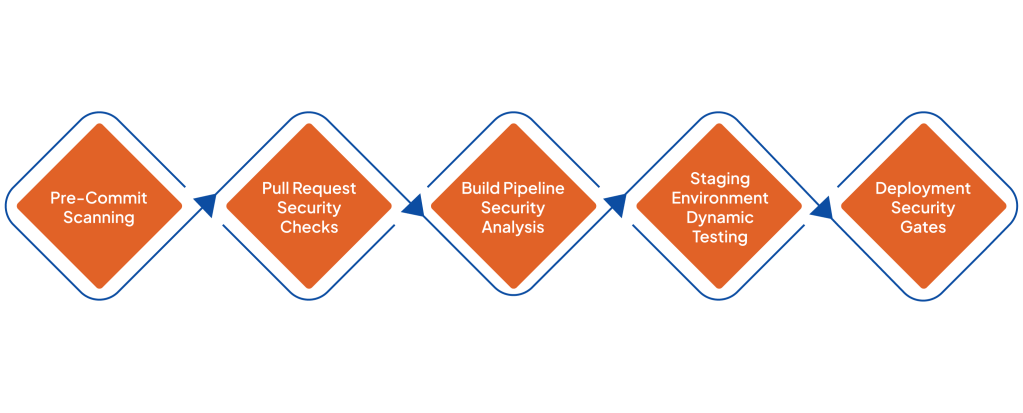
1. Pre-Commit Scanning
Developers run lightweight static scans before committing code, catching obvious security issues early.
2. Pull Request Security Checks
When developers submit pull requests, automated scanners evaluate changes and provide feedback directly in the code review interface.
3. Build Pipeline Security Analysis
During CI builds, deeper static application security testing tools perform full scans of the application.
4. Staging Environment Dynamic Testing
DAST tools run automated security tests on staging environments to detect runtime vulnerabilities.
5. Deployment Security Gates
If critical vulnerabilities are detected, deployment can be automatically halted until the issue is resolved.
This pipeline-based approach ensures continuous monitoring of source code security without requiring manual intervention at every stage.
Managing rule sets for effective security scanning
Security scanners rely on predefined rule sets to detect vulnerabilities. However, overly strict rules can generate excessive alerts, slowing down developers and reducing trust in automated tools.
Organizations can improve results by:
- Customizing security rules: Teams should tailor rule sets to match their programming languages, frameworks, and risk tolerance levels.
- Prioritizing high-risk vulnerabilities: Critical issues such as injection attacks, insecure deserialization, and authentication flaws should be flagged immediately.
- Mapping rules to security standards: Aligning rules with standards like OWASP Top 10 or internal security policies ensures that scans focus on meaningful threats.
When rule sets are properly configured, automated code review services provide developers with precise and relevant feedback.
Reducing false positives through smart tuning
One of the biggest challenges in automated security scanning is the presence of false positives-alerts that appear to be vulnerabilities but are actually safe code.
Too many false positives can cause developers to ignore security warnings entirely. To reduce this issue, organizations should:
- Regularly review scanner results to identify recurring false alerts
- Whitelist known safe patterns within the codebase
- Use machine-learning-enabled tools that improve detection accuracy over time
- Involve security experts to refine scanning rules
By tuning scanners carefully, teams can improve the effectiveness of their secure code review process while maintaining developer confidence in the tools.
Workflow automation tips for development teams
However, automating security reviews is not just about installing scanners, but about developing an application flow that integrates smoothly into the developer process.
There are a number of best practices for doing this:
- Deliver Feedback Inside Developer Tools: Security alerts must be delivered within the developer tools they are using. These tools could be an integrated development environment, a pull request, or a collaboration tool.
- Use Risk-Based Prioritization: Not all security issues must be fixed immediately. Prioritization is required based on severity and exploitability.
- Automate Remediation Suggestions: Today, code review service platforms have moved beyond just providing code review suggestions. They now offer remediation suggestions, which is a great advantage for developers.
- Clear Security Ownership: Security teams must monitor automated scanning results and update rules as new threats emerge.
In a well-designed workflow, automation is always for the developer never against.
The role of human expertise in Automated Code Reviews
While automation dramatically improves efficiency, human expertise remains essential. Automated tools identify patterns and vulnerabilities, but experienced security engineers provide context, validation, and strategic insights.
Professional code review services often combine automated scanning with expert analysis. This hybrid approach ensures that:
- Complex vulnerabilities are properly evaluated
- Business logic flaws are detected
- Security recommendations are aligned with real-world risks
Ultimately, automation enhances human reviews rather than replacing them.
Conclusion
As companies make more software faster, they need to be smarter about keeping it safe. This is where tools that automatically check for problems come in. These tools use methods to look at the code and find issues. By using these tools and adding them to the process of making software teams can make their code safer without slowing down. When these tools are set up correctly and people who know what they are doing are watching they can really help stop things from getting into the software.
If you want to make your software development process safer, ValueMentor can help. They have people who’re experts, in checking code and they can help you use these automatic tools set them up right and make a plan to keep your code safe. By combining advanced secure code review practices with powerful static application security testing, ValueMentor helps organizations identify vulnerabilities early and improve overall source code security. Partner with them today to build safer, more resilient applications without slowing down development.
FAQS
1. What is the goal of a secure code review?
The goal of a code review is to find security issues make the code better and make the source code more secure before deployment.
2. When should source code review be performed?
You should review source code through the development process. This is especially important when you make a pull request and before you release the code.
3. How do static and dynamic analysis differ?
Static analysis checks the code without running it. On the other hand dynamic analysis tests the application while it is running to find security issues.
4. What types of vulnerabilities can automate scanners detect?
Automated scanners can find problems like SQL injection, cross-site scripting, weak user authentication and incorrect settings.
5. Are automated code review tools, for CI/CD pipelines?
Yes automated tools are made to work with CI/CD pipelines. This helps to keep an eye on the source code security and improve it.
6. How do rule sets impact secure code review?
Rule sets define which vulnerabilities scanners look for, helping teams focus on relevant security risks.
7. What is the benefit of combining SAST and DAST?
Combining SAST and DAST gives you protection. It helps find problems in the code and, in the application when its running.
8. How do code review services support development teams?
Code review services help development teams by giving expert advice. They use automated tools to scan code and provide recommendations to make applications more secure.
9. Can secure code review improve software quality?
Secure code review does more than just find security issues. It also helps make the code better easier to maintain and more reliable.
10. How often should security scans be performed?
You should do security scans often. It’s best to do them every time you commit code build or deploy in your CI/CD pipeline.